images
- Progress: Done
Concepts
Overview
Image definition
- Manifest: JSON document listing configuration and layers
- Configuration: Environment variables, default
CMD, exposed ports, defaultUSER, etc. - Layers: Ordered list of tar archives representing filesystem changes, identified by SHA256 hashes
- Files: Physical binaries and libraries like
/usr/bin/curl - Deduplication: Unique layers stored once and shared across images
- Files: Physical binaries and libraries like
- Configuration: Environment variables, default
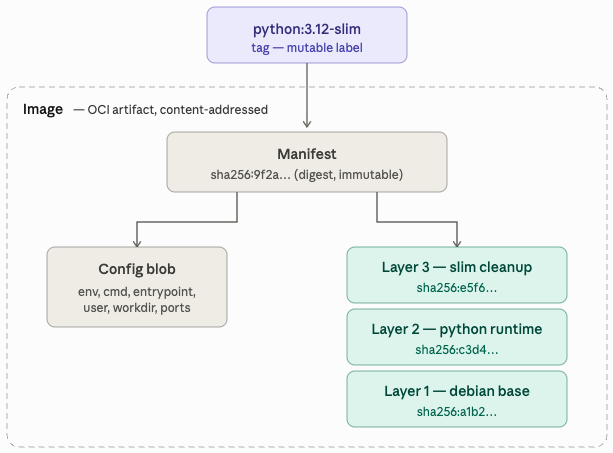
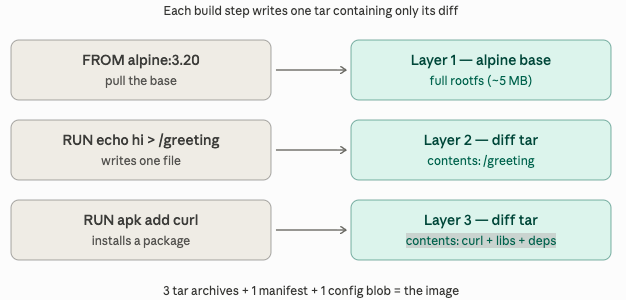
Image build process
- Step 1: Start container from previous layer state
- Step 2: Execute build command inside container
- Step 3: Diff filesystem changes against starting state
- Step 4: Tar changed files and whiteouts
- Step 5: Generate SHA256 hash of the tarball
- Step 6: Discard throwaway container
Build concepts
- Whiteout: Marker file indicating deletion of a path from lower layers
- Image size:
RUN rm -rfin a separate layer does not shrink the image - Practice: Run cleanup in the same
RUNinstruction as the installation
Components
Layer creation
- Instructions creating layers:
RUN,COPY,ADD - Instructions editing config blob:
ENV,CMD,ENTRYPOINT,LABEL,WORKDIR,USER,EXPOSE
Layer storage
- Registry: Gzipped tarball blobs identified by SHA256 hashes
- Host:
/var/lib/docker/overlay2/<random-id>/diff/ - Layer sharing: Layers are shared between images sharing the same base
Runtime combination (OverlayFS)
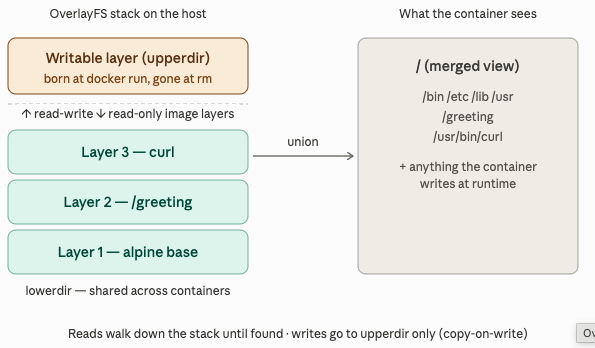
- OverlayFS: Combines multiple directories into a single unified view
- lowerdir: Stacked read-only image layers
- upperdir: Read-write directory created per container for writes
- workdir: Kernel scratch space
- merged: Unified directory mounted as container filesystem
- Copy-on-write: Modifying lower-layer files copies the entire file to
upperdir - Volumes: Database or heavy-write workloads belong on volumes, not
upperdir
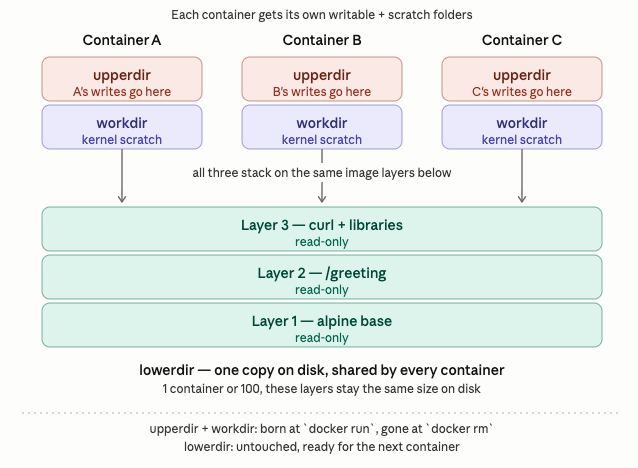
Multi-container disk usage
- Sharing: Running 50 containers from one image uses only one copy of
lowerdir - Isolation: Docker creates 50 unique pairs of
upperdirandworkdir
Storage cost breakdown
- lowerdir: Paid once regardless of running container count
- upperdir: Paid per container, scales with file writes
- workdir: Paid per container, minimal scratch overhead
- Writable layer lifecycle: Files written to
upperdirare deleted duringdocker rm - Data persistence: Databases require volumes to persist data when container is removed
Comparison
- Tag: Mutable reference pointing to a manifest digest
- Digest: Immutable SHA256 hash of the manifest, changes only if content changes
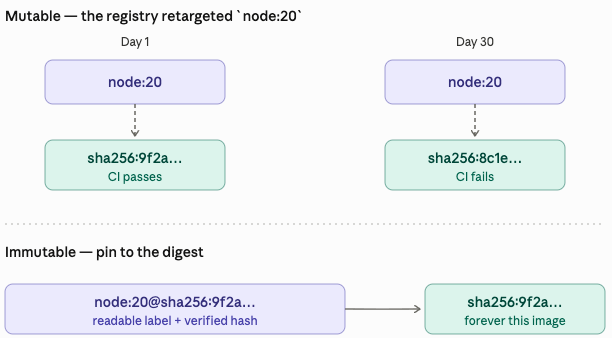
How it works
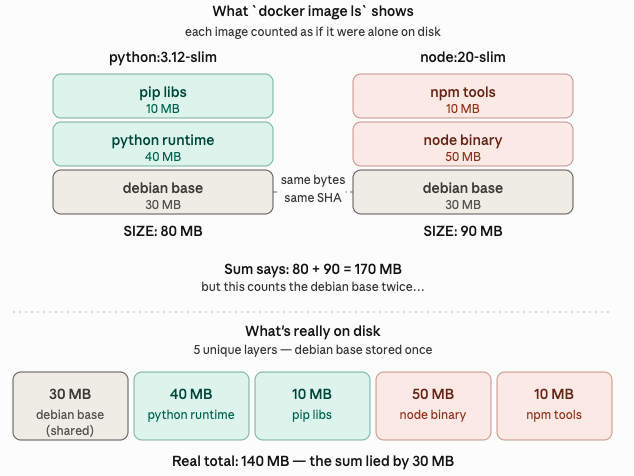
docker image ls: Shows virtual size by summing all layers, ignoring sharingdocker system df: Shows actual disk usage, accounting for layer sharing
Commands
- Rule:
docker rmiremoves the manifest, layers are deleted only when unreferenced
python rt     40 MB   → only python used it      → DELETED   (-40 MB)
pip libs      10 MB   → only python used it      → DELETED   (-10 MB)
debian base   30 MB   → node still uses it       → KEPT      ( 0 MB)
                                                  ─────────
                                       Disk freed:    50 MB
- Shared layers: Deleting an image only frees disk space for unshared layers
Best practices
- Pin by digest: Use immutable references like
node:20-slim@sha256:9f2a3b… - Disk measurement: Use
docker system dffor actual usage, notdocker image ls - Disk cleanup: Use
docker image pruneordocker system pruneto free space