The Process Abstraction
Concepts
- Process is a running program
- When program runs, OS creates new process, allocates memory, initializes CPU context, and starts it in user mode
- User programs run on CPU until OS intervenes for system calls, interrupts, or faults
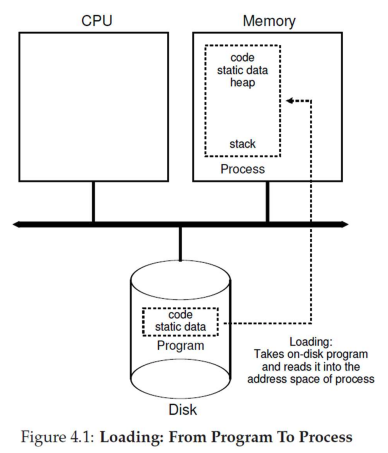
Process Definition
Concepts
- Unique Process Identifier (PID)
- Memory image in RAM, including
- Code and data from executable
- Stack and heap for runtime use
- Execution context (CPU register values)
- Program Counter (PC) holds instruction address
- Other registers hold data
- Context resides in CPU registers when running and is saved to memory when paused
- I/O state
- Open files, network connections, and other I/O information
Process States
Categories
- Running: Currently executing on CPU - context resides in CPU registers
- Blocked / suspended / sleeping: Cannot run, waits for event (e.g., I/O completion)
- Ready / runnable: Ready to run, waiting for OS scheduler
- Context of blocked and ready processes is saved in OS memory for later resumption
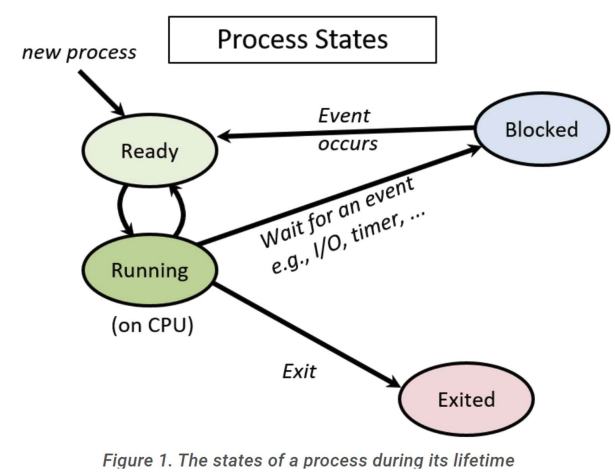
Process State Transitions
Examples
- Initially, P0 is running, and P1 is ready
- If P0 requests disk data via system call, OS handles request but moves P0 to blocked state (data not immediately available). OS switches to P1
- P1 runs. Interrupt from disk occurs, signaling P0's requested data is ready. CPU jumps to OS, handles interrupt, and moves P0 to ready state
- OS can continue running P1 - scheduler will switch to P0 later
Process Control Block (PCB)
Concepts
- PCB is kernel data structure storing all process information
- Contains
- Process Identifier (PID)
- Process state (running, ready, blocked, terminated, etc.)
- Pointers to related processes (parent, children)
- Saved CPU context of process when not running
- Information regarding process memory locations
- Information regarding ongoing I/O communication
- Known by different names across OSes (e.g.,
task_struct in Linux)
CPU Scheduler
Concepts
- OS maintains list of all PCBs
- Scheduler loops through list, picking ready process to run on each CPU core
- Periodically performs context switches between processes
Booting
How it works
- System boot triggers Basic Input Output System (BIOS) execution
- BIOS (stored in non-volatile memory) initializes hardware
- BIOS locates boot loader in boot disk (hard disk, USB, etc.)
- Boot loader (simple assembly/C program) locates and loads OS
- Boot loader sets up CPU registers, loads kernel image from disk to memory, and transfers control to kernel
- OS code executes, exposes user terminal, and allows program initiation
Booting Real Systems
Overview
- Legacy/simple OS bootloaders fit into 512-byte first sector of boot disk (required for easy BIOS discovery)
- Modern OS bootloaders are complex (reading large kernel images from disk/network) and exceed 512 bytes
- Real-life booting follows two-step process
- BIOS loads simple bootloader
- Simple bootloader loads complex bootloader
- Complex bootloader loads OS