Computer System
Concepts
- User software: Applications (browser, email client, games, application servers, databases, AI/ML algorithms, etc.)
- System software: Operating System (OS), etc.
- Hardware: CPU, memory, I/O devices, etc.
Operating System
Concepts
- Middleware between user software and hardware (e.g., Linux, Windows, MacOS)
- Contains kernel (core functionality) and other programs (shell, commands, utilities)
Overview
- Manages hardware: CPU, main memory, I/O devices (hard disk, network card, mouse, keyboard)
- OS provides standardized API (system calls) - applications avoid direct, complex, and dangerous hardware interaction
- Abstracts hardware by hiding complex, low-level physical component details
- Optimizes CPU, memory, and resource usage by allocating process resources and duration
- Ensures process separation - one program cannot crash/impact another or the entire system
Program
Concepts
- Executable file stored on disk
- Contains code (CPU instructions) and data for specific task
- App package icon (.app) contains Contents folder (executable file) and Resources (data)
- Process is a running instance of a program loaded into memory by OS
- Single program (e.g., Google Chrome) can run as multiple processes to handle separate tasks (e.g., main UI process, individual tab processes)
Flow
- Stage 1: Compilation
- Compiler translates high-level code into executable file (machine code and data)
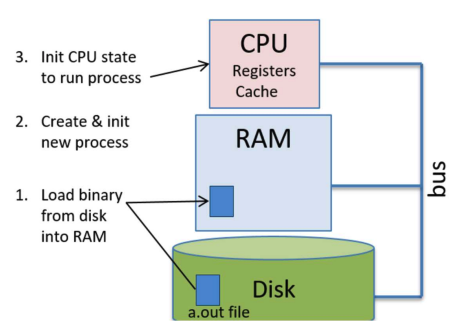
- Executable file (e.g., "a.out") is created and stored on hard disk
- Stage 2: Loading - OS
- OS creates process and Process Control Block (PCB) to track status
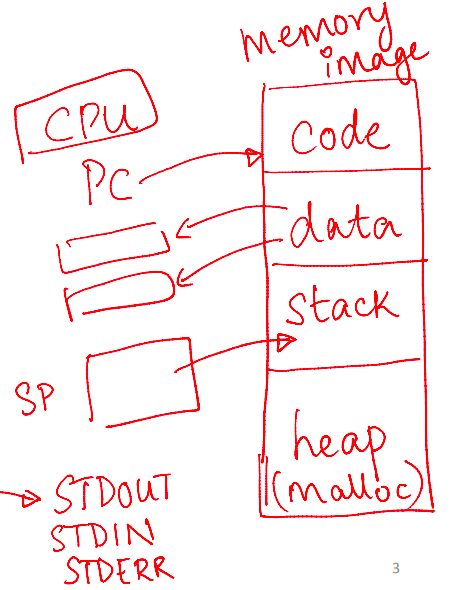
- OS allocates private virtual address space for process
- OS loader reads executable file from disk and loads into memory
- OS allocates stack for process
- OS initializes CPU context
- Sets Program Counter (PC) to virtual address of program's entry point (first instruction)
- Sets Stack Pointer (SP) to top of allocated stack
- Initializes other registers
- OS places process in ready queue
- Stage 3: Execution - CPU
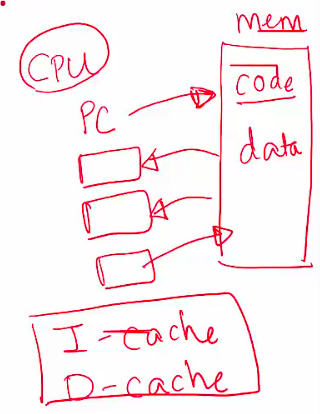
- CPU fetches instruction pointed by PC from memory
- CPU increments PC to point to next instruction
- CPU decodes instruction to determine operation
- CPU loads data from memory into registers if needed
- CPU executes instruction
- CPU stores results back into register or memory location
CPU Virtualization
Overview
- Historically, computers ran one program at a time, causing slow/poor user experience (e.g., cannot listen to music while browsing)
- OS solves this via CPU Virtualization - allows running multiple programs simultaneously
- Relies on two key mechanisms
- OS scheduler decides which program to run next and for how long
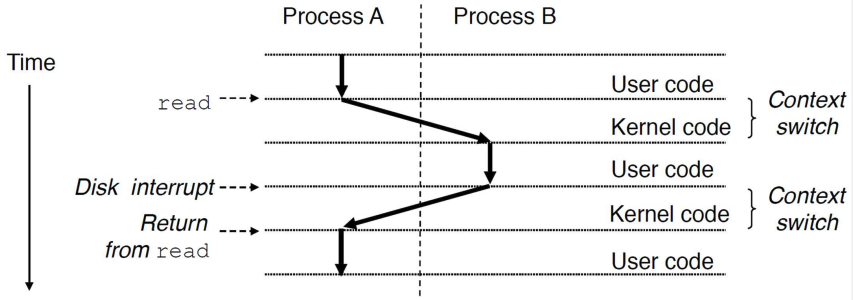
- OS performs context switch - quickly swaps processes on/off CPU
- Fast switching creates illusion every program has dedicated CPU
Flow
- OS runs Program A for a short time
- OS pauses Program A and saves current state/execution context
- OS loads saved state of Program B
- OS runs Program B for a short time before switching again
Memory Virtualization
Overview
- Without memory virtualization, programs use physical RAM directly, causing major issues
- Bug in one program could overwrite/corrupt memory of another program or OS, crashing system
- Program could read/modify another program's private data (security risk)
Concepts
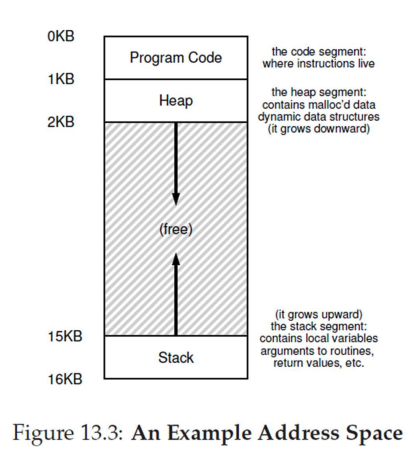
- Program memory view
- Code: Program instructions
- Data: Global and static variables
- Heap: Dynamically allocated memory (grows as needed)
- Stack: Function calls and local variables (grows and shrinks)
Flow
- OS maintains page table for each program acting as a map
- Map translates program's virtual addresses into physical addresses in RAM
- Guarantees each program remains separate and isolated
Address Space
Concepts
- Virtual Address Space: Illusion of memory provided by OS. Program sees one large, continuous block starting at address 0
- Physical Address: Real address of data inside RAM. Program data is actually scattered in small chunks across physical RAM
How it works
- Programmer uses virtual addresses (e.g., pointer in code shows virtual address)
- OS intercepts program attempts to access virtual address
- OS translates virtual address into real physical address to retrieve correct data
- Memory virtualization keeps every program separate and safe
Isolation and Privilege Levels
Overview
- Running multiple programs requires isolation to protect processes from one another, prevent data corruption, and share hardware safely
- Mechanisms are built directly into CPU
Concepts
- CPUs create isolation using privilege levels
- Unprivileged instructions: Regular, safe commands (e.g., adding numbers, reading own data)
- Privileged instructions: Sensitive, powerful commands affecting entire computer (e.g., managing memory, accessing hardware)
- Low Privilege Level (Ring 3 / User Mode): Safe mode where CPU only executes unprivileged instructions
- High Privilege Level (Ring 0 / Kernel Mode): Powerful mode where CPU executes all instructions
User Mode and Kernel Mode
Concepts
- User Mode (Unprivileged): Runs user programs (browser, games). CPU executes only unprivileged instructions
- Kernel Mode (Privileged): Runs OS. CPU executes all instructions, including privileged ones
Flow
- CPU switches from User Mode to Kernel Mode when OS requires control. Triggers include
- System calls: User program requests OS service (e.g., opening a file)
- Interrupts: External hardware event requires OS attention (e.g., mouse click)
- Program faults: Program error (e.g., dividing by zero) requiring OS handling
- After OS completes task in Kernel Mode, CPU shifts back to User Mode, and original program continues
System Calls
Concepts
- System call occurs when user program requests service from OS
- Normal user program cannot run privileged hardware instructions directly (safety feature preventing accidental/malicious harm)
Examples
- Program requesting to read data from hard disk
- C library
printf function invokes real system call to write text to screen
Flow
- User program requests OS service via system call
- CPU jumps from user code to OS handler code for specific call
- OS finishes task - CPU returns to user code at exact interruption point
- Tip: Programmers use standard library functions (e.g.,
printf) to handle system calls instead of making direct calls
Interrupts
Overview
- CPU must handle external events (mouse clicks, key presses) alongside running programs
- Prevents CPU from wasting time waiting for I/O devices (e.g., waiting for hard drive data)
Concepts
- Interrupt is external signal from I/O device requesting CPU attention
Examples
- Hard drive finishes preparing data and sends interrupt signal to CPU
Interrupt Handling
Flow
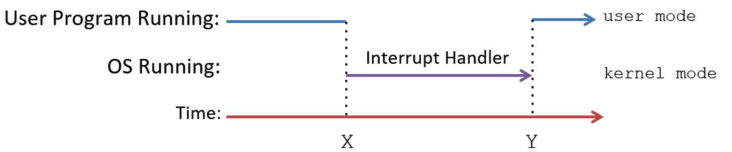
- CPU runs Program P when interrupt signal arrives
- CPU immediately saves current state/context of Program P
- CPU switches to Kernel Mode to run OS interrupt handler code (e.g., reading keyboard character)
- OS completes handling - CPU restores saved state of Program P
- CPU resumes Program P in User Mode
- Note: Interrupt handling code is part of OS. CPU runs OS handler and returns to user code
I/O Devices
Concepts
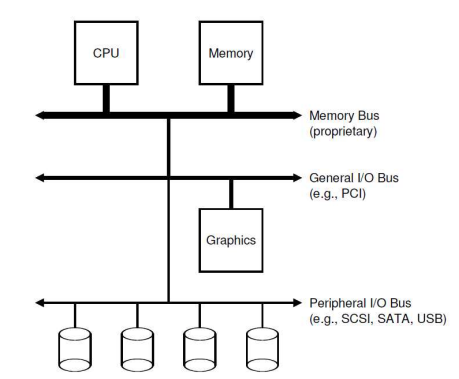
- CPU and memory connect via fast system/memory bus
- I/O devices (keyboards, monitors, hard drives) connect to CPU/memory using separate buses
- OS manages all I/O devices on behalf of user programs
Overview
- I/O device primary roles
- Interface with external world (keyboard, mouse, screen)
- Store user data persistently (hard drive, SSD)
Device Controller and Device Driver
Concepts
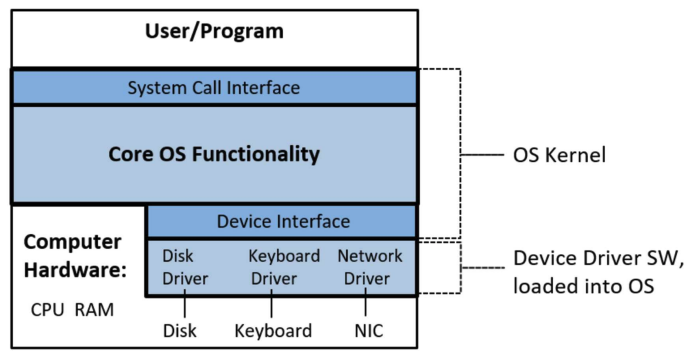
- Device Controller: Small microcontroller chip managing specific I/O device. Communicates with CPU/memory over bus
- Device Driver: Special OS software providing device-specific knowledge to handle I/O operations
How it works
- OS kernel uses device driver to
- Initialize I/O device upon computer startup
- Start I/O operations via device commands (e.g., instructing hard disk to read data block)
- Handle interrupts from device (e.g., hard disk signaling read completion)
Conclusion
Summary
- Architecture/OS knowledge is essential for writing high-performance, reliable programs
- OS study addresses
- Program execution mechanics
- Performance optimization
- Security, reliability, and fault tolerance
- Troubleshooting slow performance and resource consumption
- OS expertise is critical for building complex real-world systems
Next steps
- Architecture + OS: Foundation for understanding single-machine program execution
- Networking: Cross-machine program communication
- Databases and data storage: Efficient, reliable data storage across machines
- Performance engineering: Program speed optimization
- Distributed systems: Multi-application/multi-machine reliable task execution
- Other topics: Virtualization, cloud computing, security